EdTech Infrastructure: Moving AI Lesson Generation Out of the Chat Box
Arcadia moves lesson generation out of a blank chat prompt and into a controlled LMS-style workflow with typed teacher inputs, Pydantic validation, task-specific model routing, streamed output, buffering, output cleanup, and LMS-ready data models.
Teacher Form
Typed Request
Pydantic Guard
Model Router
SSE Stream
Lesson Model
A raw AI chat box is the wrong interface for a teacher who is already overloaded.
That was the starting point for Arcadia.
A friend-of-a-friend runs an LMS system serving schools in the regions. The goal was to prototype an AI layer that could eventually plug into that kind of environment: elementary and high school teachers, limited time, uneven resources, and real classroom pressure.
The problem was not whether an LLM could produce a lesson plan.
It could.
That was also the problem.
A teacher can open ChatGPT, type “make me a lesson plan,” and get something that looks useful at first glance. The output may have headings, activities, objectives, assessment, and a polished tone. But the teacher still has to check whether the lesson fits the grade level, whether the duration makes sense, whether the activity is realistic, whether the questions actually test understanding, and whether the structure matches how they teach.
For a teacher already carrying too much work, that is still work.
I did not want Arcadia to become another clean wrapper around a model.
The first useful design decision was to move lesson generation out of a blank chat flow and into a controlled LMS-style workflow.
The teacher starts with a session, not a blank prompt
The teacher does not start with an empty prompt. They define the session:
topic
subject
grade level
duration
lesson type
teaching framework
prior knowledge
learning objectives
student context
That gives the backend actual structure to work with.
The request flow looked like this:
teacher form
→ Next.js lesson planner
→ typed frontend request
→ FastAPI endpoint
→ Pydantic validation
→ AI service orchestration
→ task-specific model lane
→ streamed lesson response
→ buffered frontend rendering
The workflow gives the backend structured teaching context before the model starts writing.
The backend boundary matters more than the model choice
The backend boundary mattered more than the model choice.
The FastAPI layer exposes two lesson paths:
POST /api/v1/ai/generate/lesson
POST /api/v1/ai/stream/lesson
The synchronous route is useful for standard request-response generation. The streaming route is the better user experience for lesson planning because teachers can see the document forming instead of staring at a loading state.
The frontend uses a real fetch stream, reads from ReadableStream, decodes chunks through TextDecoder, parses data: payloads, handles [DONE], and supports cancellation through AbortController.
That sounds like implementation detail, but it changes the product feel.
Long AI generations create anxiety when the screen is blank. Streaming gives the user proof that the system is working. It also gives the frontend a clean way to stop the request when the teacher realizes the parameters are wrong.
The UI does not dump every network chunk directly into React state. It uses a network buffer and a display buffer. Incoming tokens go into the network buffer. The display layer catches up smoothly using requestAnimationFrame.
That avoided a jittery interface where the lesson text stutters every time a chunk arrives.
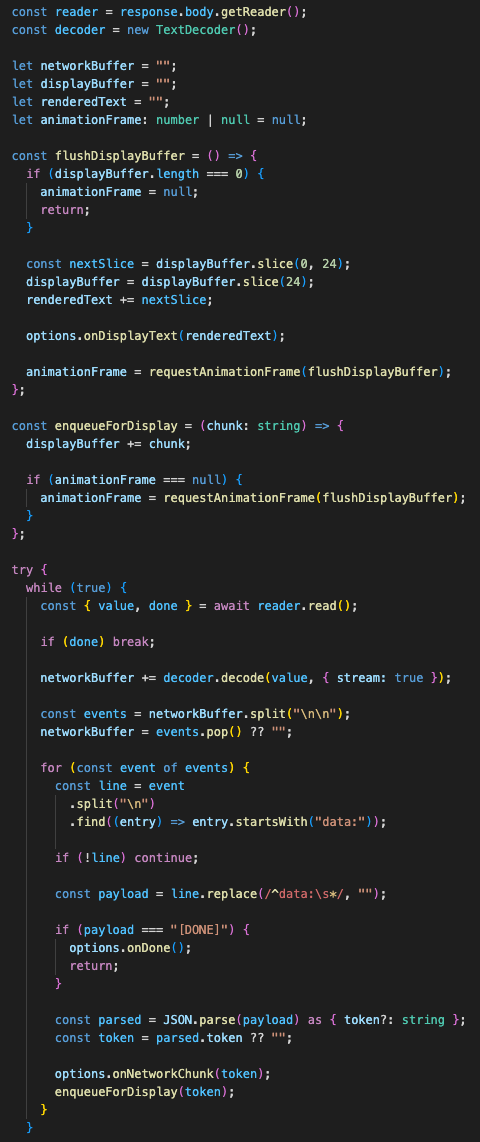
The frontend separates network chunks from rendered output so long lesson generation feels steady instead of twitchy.
The schema protects cost and runtime
The second boundary was the schema.
The backend request is not an open-ended blob of text. It goes through a Pydantic model with limits:
- Topic length
- Subject length
- Grade level length
- Duration range
- Student context length
- Prior knowledge length
- Learning objective count
- Curriculum standard count
- Additional notes length
For quizzes, the same idea applies:
- Maximum content length
- Maximum number of questions
- Difficulty enum
- Passing score range
- Topic-or-content requirement
This protects more than validation correctness. It protects cost and runtime.
An LMS AI feature can be abused accidentally. A user can paste too much content. A browser can retry. A demo can get hammered. A long prompt can run longer than expected and burn provider tokens.
So the system has limits before the model call.
The API also has request-size protection and Redis-backed rate limiting when Redis is available. The current demo mode is strict: ten requests per minute, upload size caps, model timeouts, and low retry counts.
That is the kind of boring boundary work AI demos usually skip.
It matters because the buyer does not care that a model can generate text once. They care whether the feature can be exposed to real users without surprise bills or unstable behavior.
Different teaching tasks need different model lanes
The model layer is split by task.
Lesson planning uses DeepSeek V3.1 through Together AI using the OpenAI-compatible client pattern. That lane handles reasoning-heavy lesson generation.
Quiz generation and content suggestions use a separate action model, Llama 4 Scout, configured with lower temperature and JSON response formatting.
lesson planning
→ expert/reasoning model

quiz and suggestions
→ action/structured-output model
Lesson plans and quizzes have different output shapes, so the backend routes them through different model lanes.
That split is important.
A lesson plan can be long-form markdown. A quiz needs stricter structure. Questions, options, correct answers, explanations, and cognitive diagnostics need to land in a predictable shape.
For quiz output, the backend asks for JSON, then still assumes the model may return imperfect text. It strips reasoning tags, extracts the JSON block, parses it, and falls back to text extraction if parsing fails.
That is a healthier assumption than trusting the model to behave perfectly every time.
The same cleanup exists for lesson streaming.
Reasoning models can leak <think> blocks. The streaming path actively watches for those tags and drops reasoning content before it reaches the teacher. It also handles partial tag fragments across chunks, because streamed output does not always respect convenient boundaries.
That is a small detail, but it is the kind of detail that separates a usable AI feature from a rough demo.
The domain models point toward LMS integration
The backend also sets model metadata on the response headers. The response body stores the model used. The database models are already shaped around AI-generated lessons, content blocks, quizzes, questions, attempts, answers, and AI metadata.
The current portfolio demo runs stateless for generation, with database and auth disabled in the AI endpoints. That was intentional for the prototype path. But the data model is already pointing toward the LMS integration shape:
Lesson
→ ContentBlock
→ Quiz
→ Question
→ QuizAttempt
→ QuizAnswer
The lesson model stores the educational context:
student_context
teaching_style
prior_knowledge
learning_objectives
standards_alignment
ai_model_used
ai_prompt_used
The content block model supports ordered lesson material and versioning.
The quiz model supports attempts, answers, grading metadata, passing scores, and question-level structure.
That matters because the long-term system should not just generate a document and disappear. In an LMS, generated content needs to become editable teaching material, attach to lessons, connect to quizzes, track attempts, and preserve enough metadata to debug what happened later.
The MVP does not yet do every part of that. It should not pretend to.
Right now, the actual architecture is a controlled generation layer with schema validation, rate limits, streaming, model routing, output cleanup, and database-ready domain models.
The next hardening step is post-generation validation
The next serious step would be deterministic post-generation validation.
For example:
generated lesson
→ section parser
→ duration checker
→ grade-level readability check
→ curriculum standard check
→ missing-field check
→ teacher review queue
→ saved lesson version
That is where this can move from “AI-assisted lesson generation” into a stronger LMS content pipeline.
The important thing is that the control point already exists. The model is behind the service boundary. The frontend does not talk to the provider directly. The backend owns the request contract, model selection, timeouts, rate limits, output cleanup, and response shape.
That makes the system easier to improve without changing the teacher workflow every time.
The product difference is the control layer
For regional schools, this matters.
The target user is not an AI hobbyist trying prompts for fun. It is a teacher or LMS operator trying to reduce prep load without creating a new review burden. A raw chat window gives them output. A controlled workflow can give them material that is closer to how the school actually teaches.
Arcadia is still a prototype, but the architecture direction is right:
- Controlled inputs
- Bounded requests
- Task-specific model routing
- Streamed generation
- Structured output handling
- LMS-ready data models
- Future validation hooks
That is the product difference.
The model call is the easiest part to copy. The harder work is the backend control layer around it: what the system accepts, what it rejects, how it limits cost, how it streams output, how it handles broken JSON, how it stores generated material, and how it gives teachers something closer to a usable lesson instead of another AI blob to clean up.
Onto the next one. Let’s keep sharpening that edge!
First written on December 09, 2025.
Want to implement this architecture in your business?
Discuss Your Project